TABLE OF CONTENTS
FUNCTIONAL DESCRIPTION
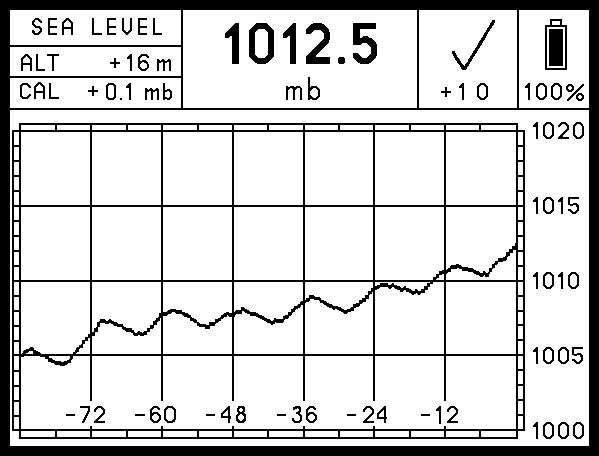
The Steamrock SB-42 digital barograph detects and records changes in atmospheric pressure. It displays current atmospheric pressure, a graph showing changes in that pressure over 84 hours, and a World Meteorological Organization (WMO) symbol depicting changes over three hours. Beneath that symbol is a numeric value representing net value changes over the three hours.
Atmospheric pressure is measured every 15 minutes and is stored in a built-in memory. Results are shown on a high-contrast sunlight readable e-paper display. Steamrock SB-42 is a standalone device that does not require software updates, internet connection, or an external power supply. It operates on three AAA batteries, displaying the remaining charge using both a battery icon and a percentage.
Although this barograph is not a tool for extremely precise lab measurement, it is perfectly suitable for keeping track of atmospheric pressure tendencies. Thus, it can be used as an aid to navigation and an instrument for weather observation.
DISPLAY
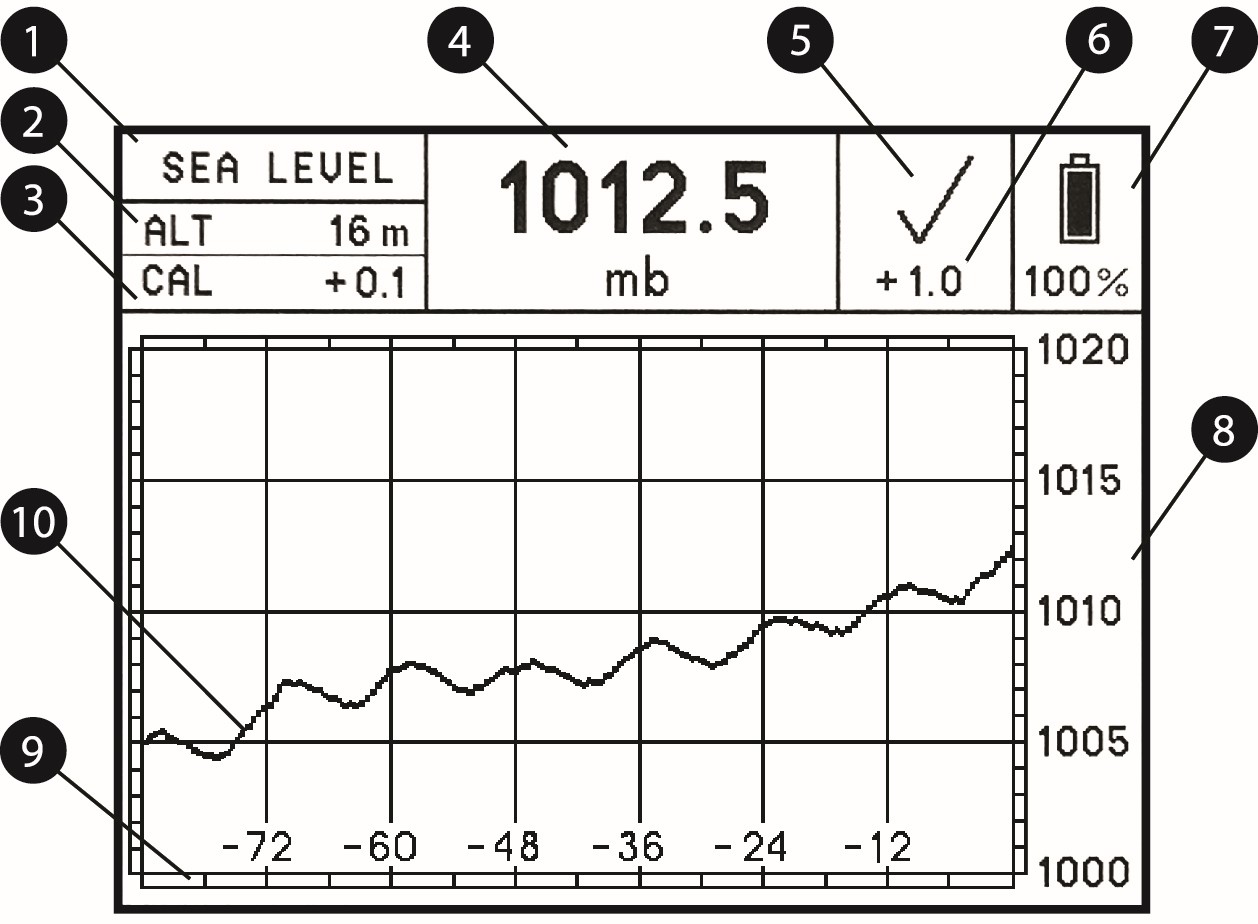
- Pressure display mode
There are two atmospheric pressure display modes:- SEA LEVEL
In this mode, the device will calculate and display actual atmospheric pressure reduced to sea level atmospheric pressure after the user adjusts the device for the current altitude above or below sea level. - STATION
In this mode, the device will display the actual atmospheric pressure at its location and elevation when the altitude is set to zero.
- SEA LEVEL
- Altitude
Altitude above or below sea level is displayed in meters or feet. Refer to SETTING THE UNITS and SETTING THE ALTITUDE sections for details. - Calibration value
The amount that the sensor has been corrected is displayed in chosen pressure units.
Refer to SETTING THE CALIBRATION section for details. - Current atmospheric pressure
Current atmospheric pressure is read every 15 minutes. The 15-minute period starts once the batteries have been installed, when the device has been reset, or any time a pushbutton is pressed. - Three-hour pressure tendency symbol
A WMO symbol is used to represent the characteristics of atmospheric pressure tendency during the three hours preceding the time of current pressure reading, as described in the WMO manual: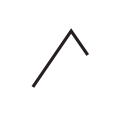 Code 0: Increasing, then decreasing; atmospheric pressure the same as or higher than three hours ago.
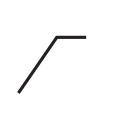 Code 1: Increasing, then steady; or increasing, then increasing more slowly; atmospheric pressure now higher than three hours ago.
 Code 2: Increasing (steadily or unsteadily); atmospheric pressure now higher than three hours ago.
 Code 3: Decreasing or steady, then increasing; or increasing, then increasing more rapidly; atmospheric pressure now higher than three hours ago.
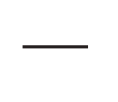 Code 4: Steady; atmospheric pressure the same as three hours ago.
 Code 5: Decreasing, then increasing; atmospheric pressure the same as or lower than three hours ago.
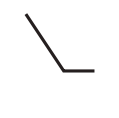 Code 6: Decreasing, then steady; or decreasing, then decreasing more slowly; atmospheric pressure now lower than three hours ago.
 Code 7: Decreasing (steadily or unsteadily); atmospheric pressure now lower than three hours ago.
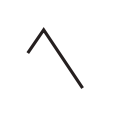 Code 8: Steady or increasing, then decreasing; or decreasing, then decreasing more rapidly; atmospheric pressure now lower than three hours ago.
- Three-hour pressure tendency
The three-hour pressure tendency number represents the difference between the atmospheric pressure now and three hours ago. A positive number indicates that the pressure is now higher than three hours ago; a negative number indicates that it is now lower. If, for any reason, this number exceeds ± 99 mb (hPa) or ± 2.99 inHg, the symbol “—” will replace the numbers. - Battery state
A battery icon and a percentage value provide information on the level of battery charge. Refer to BATTERIES section for details. - Pressure scale
The device has five pressure scale ranges. The scale adjusts automatically to fit the graph to the screen, depending on the difference between maximal and minimal pressure displayed.- For mb / hPa:
- The scale range is divided into 20 units, with their values depending on the maximal and minimal pressure displayed. The range the device uses most of the time is 20 mb (e.g., 1000 ~ 1020 mb or 1005 ~ 1025 mb) divided into 1mb units.
- If the pressure change during the past 84 hours is more than 11 and less than 22 mb, which may happen during a significant weather event or if the device is relocated to a different altitude, the range will be 40 mb (e.g., 990 ~ 1030 mb) divided into 2 mb units.
- The other three rarely used scale ranges are a 100 mb range divided into 5 mb units, a 200 mb range divided into 10 mb units and a 400 mb range divided into 20 mb units. These ranges would be chosen automatically if the pressure change during the past 84 hours was more than 22 and less than 55 mb, more than 55 and less than 110 mb, or more than 110 and less than 240 mb, respectively.
- The same scale ranges apply to hPa.
- For inHg:
- The scale range is divided into 8 units, with their values depending on the maximal and minimal pressure displayed. The range the device uses most of the time is 0.8 inHg (e.g., 29.2 ~ 30.0 inHg or 29.4 ~ 30.2 inHg) divided into 0.1 inHg units.
- If the pressure change during the past 84 hours is more than 0.44 and less than 0.88 inHg, which may happen during a significant weather event or if the device is relocated to different altitude, the range will be 1.6 inHg (e.g., 29.1 ~ 30.7 inHg) divided into 0.2 inHg units.
- The other three rarely used scale ranges are a 4 inHg range divided into 0.5 inHg units, an 8 inHg range divided into 1 inHg units and a 16 inHg range divided into 2 inHg units. These ranges would be chosen automatically if the pressure change during the past 84 hours was more than 0.88 and less than 2.2 inHg, more than 2.2 and less than 4.4 inHg, or more than 4.4 and less than 8.8 inHg, respectively.
- The graph will accommodate a big change in pressure by reducing its vertical range, making differences slightly more difficult to distinguish. The device will automatically adjust the graph over the next 84 hours. If you do not want to wait for it to adjust the graph automatically, you can manually reset the device. Refer to RESETTING section for details.
- For mb / hPa:
- Time scale
The numbers and their corresponding vertical lines represent the number of hours that have passed since the most recent pressure reading. - Graph
The graph depicts the history of atmospheric pressures measured over the past 84 hours.
PUSHBUTTONS
There are three pushbuttons on the rear side of the device, to the right of the batteries.
These pushbuttons are “+”, “-“, and “R”.
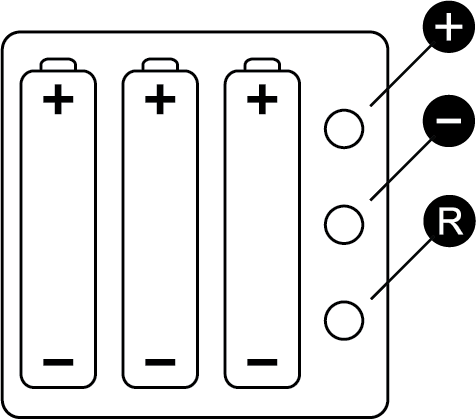
Under normal operating conditions, there is no need to use the pushbuttons because the scale and graph will be automatically selected. These pushbuttons are only used for initial setup, calibration, reset, or when the device has been relocated to a different altitude.
RESETTING
The device can be reset if you want to clear the pressure history records and manually set the 20 mb (hPa) or 0.8 inHg scale, for example, when you have relocated the device to a very different altitude and do not want to wait for the device to automatically adjust its scale range over time.
To reset the device, press and hold the “R” pushbutton. You will hear a short beep in less than a second. Continue holding the “R”. Approximately 3 seconds later, you will hear a double beep, followed by a triple beep after about 4 seconds. Keep holding the “R” until you hear two double beeps, then release the “R” pushbutton. The screen will be updated, showing the current pressure and a flattened graph set at the smallest scale range. All pressure history records will be erased, but altitude and calibration settings will remain the same.
SETTING THE UNITS
You can set the units for pressure and altitude as follows: hectopascals (hPa) and meters (m), inches of mercury (inHg) and feet (ft), and millibars (mb) and meters (m).
To select a unit pair, press and hold the “R” pushbutton. When you hear a short beep, release the “R” pushbutton. Simply repeat this procedure to select another unit pair.
SETTING THE CALIBRATION
Your barograph is shipped with the calibration (correction) setting already preset. You may want to introduce your own calibration, for example, when you see it is slightly differing from a trusted local source or if you need to adjust for normal sensor drift.
If you believe that this device’s pressure reading is lower than actual local pressure, you can increase the calibration (CAL) number by pressing and holding the “R” pushbutton until you hear a short beep. While you continue holding the “R” pushbutton down, within 2 seconds, press and hold the “+” pushbutton until you hear a short beep, indicating the addition of 0.1 mb. The “+” pushbutton will keep adding 0.1 mb to the barograph’s reading with each beep as long as you hold it down.
If you believe that the device’s pressure reading is higher than actual local pressure, you can reduce the CAL number by pressing and holding the “R” pushbutton until you hear the short beep. While you continue holding the “R” pushbutton down, within 2 seconds, press and hold “-” pushbutton until you hear a short beep, indicating the subtraction of 0.1 mb. The “-” pushbutton will keep subtracting 0.1mb from the barograph’s reading with each beep as long as you hold it down.Note that the CAL number will not be updated on the screen until the pushbuttons are released. Therefore, you need to keep counting the beeps until the desired number is reached. Then, release the pushbuttons.
After releasing the pushbuttons, check the CAL number on the screen. If the CAL number is not the number you intended, you can readjust it using the same procedures as described above.
The procedure is the same for hPa or inHg, except that when using inHg to set the calibration, 0.01 inHg will be added or subtracted with each step.
The CAL number can be adjusted as much as ±10 mb (hPa) or ±0.3 inHg.
SETTING THE ALTITUDE
When you move the device to a new location, you may need to adjust its altitude setting. To increase or decrease the altitude (ALT) number, simply press and hold the “+” or “-” pushbutton. You will hear a short beep, indicating a 1m increase or decrease in altitude setting, depending on which button you push. The pushbutton will keep adding or subtracting 1m to or from the ALT setting with each beep as long as you hold it down.
Note that the ALT setting will not be updated on the screen until the pushbutton is released. Therefore, you need to keep counting the beeps until the desired altitude setting is reached. Then, release the pushbutton.
After releasing the pushbutton, check the ALT setting on the screen. If it is not the altitude number you intended, you can readjust it using the same procedure as described above. The altitude can be set at any whole number between -200m and +1500m.
To add or subtract tens or hundreds of meters, you will need to follow these simple instructions:
- To add 10m per step, press and hold the “+” pushbutton indicating you want to add until you hear a short beep. While you continue holding the “+” down, press the “-” pushbutton to get the device to add in tens of meters. Each double beep will indicate that 10m has been added.
- To add 100m per step, follow the same procedure, except instead of pressing the “-” for tens, press the “R” for hundreds. Each triple beep will indicate that 100m has been added.
- To subtract 10m per step, press and hold the “-” pushbutton, indicating you want to subtract, until you hear a short beep. While you continue holding the “-” down, press the “+” pushbutton to get the device to subtract in tens of meters. Each double beep will indicate that 10m has been subtracted.
- To subtract 100m per step, follow the same procedure, except instead of pressing the “+” for tens, press the “R” for hundreds. Each triple beep will indicate that 100m has been subtracted.
The procedure for setting the altitude in feet is the same, with increments of 1ft, 10ft, or 100ft added or subtracted with each step, respectively. Altitude can be set to any whole number between -656ft and +4921ft.
GRAPH OPTIONS
To choose graph option, press and hold the “R” pushbutton. You will hear a short beep in less than a second. Continue holding the “R” for 3 seconds. When you hear a double beep, release the “R”. After the “R” pushbutton is released, you will see a new graph option (A or B) displayed. If you prefer the previous option, just repeat this procedure.
OPTION A
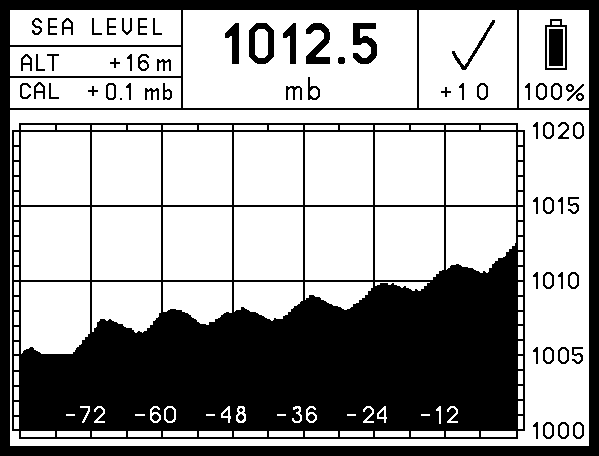
OPTION B
DISPLAY MODES
There are two display modes: Light and Dark. To choose the display mode, press and hold the “R” pushbutton. You will hear a short beep in less than a second. Continue holding the “R” for 3 seconds. You will hear a double beep. Keep holding the “R” down for about 4 more seconds. Release the “R” pushbutton after three short beeps have been sounded. The display mode will be changed.
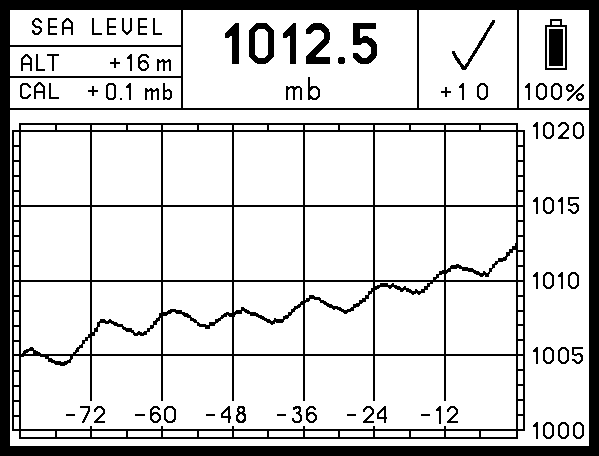
LIGHT MODE
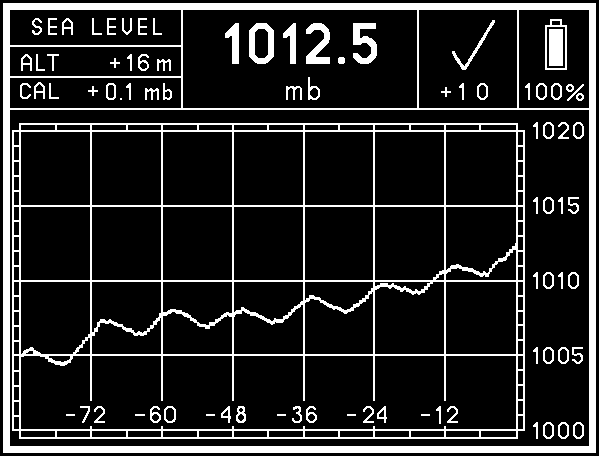
DARK MODE
BATTERIES
- Use high-quality batteries only. Panasonic EVOLTA AAA alkaline batteries are recommended for this device.
- NiMH rechargeable batteries can be used, but the battery charge state (displayed on the screen) will not be correct, and the operating time will be shorter.
- Zinc-carbon batteries are not recommended for this device.
- Lithium primary batteries were not tested with this device.
- Replace all batteries at the same time. Do not mix old and new batteries, and do not mix different types of batteries or batteries produced by different manufacturers.
- When installing the batteries, be sure to observe the polarity marked in the battery holders. In this device, all positive terminals are up.
- When new batteries are inserted, the device will restart automatically. It will measure current atmospheric pressure and display it on the screen along with the data previously stored in the memory. The 15-minute period will start at this time.
- When the battery charge falls below operating limits, you will see the warning message “REPLACE BATTERIES” on a blank screen. The device will also produce a beep to the tone of the Morse code letter “B” (- …) once.
- When you see the “REPLACE BATTERIES” warning, replace or remove the old batteries as soon as possible. Leakage of the discharged batteries can cause permanent damage to the device.
- No matter if the batteries are low or removed, the device will keep previous records and settings in its internal memory. There may be a sudden discordant “step” on the graph if you replace the batteries a while after you have noticed the warning message “REPLACE BATTERIES” due to changes in atmospheric pressure that have occurred during downtime.
- Before leaving the device unattended for a prolonged period of time, check the battery charge. If the battery charge is low, you may want to replace or remove the batteries to keep them from falling below operating limits while unattended and prevent battery leakage.
WARNING MESSAGES
The device might show one of two warning messages:
- “Outside operating limits”
If the measured pressure is higher or lower than stated in SPECIFICATIONS section or if the sensor malfunctions, the display will show the warning message “OUTSIDE OPERATING LIMITS” on a blank screen. No measurements will be recorded while this message is displayed, though the device will continue monitoring the pressure every 15 minutes. Once the pressure returns to a range within the designated limits again, the barograph will automatically resume normal operation. - “Replace batteries”
When the charge of the batteries falls below operating limits, the display will show the warning message “REPLACE BATTERIES” on a blank screen. No measurements will be taken while this message is displayed. It is strongly recommended that you replace or remove the batteries when this message appears. Refer to BATTERIES section of this manual for more details.
CAUTION
- This device was designed for indoor use only. Although the face of the device is generally splash-proof, it should not be exposed to rain or liquids from other sources, such as cleaning.
- Do not clean this device with chemicals, expose it to direct sunlight, or operate it below 0 °C (32 °F).
- If the device’s batteries have been replaced, the device has been reset, or the CAL/ALT has been adjusted, it will take 3 hours to get a fully accurate 3-hour tendency symbol and 3-hour pressure tendency.
- Electronic paper displays do not need power to retain their images. Therefore, this device will continue displaying the last image on the screen even in the unlikely event of a malfunction or loss of power.
- In no case should this device be used as the sole basis for weather prediction or navigation decisions. The user assumes sole responsibility, legal or otherwise, for these decisions.
MOUNTING INSTRUCTIONS
1. Remove the mounting plate from the back of the device using the provided Phillips mini screwdriver.
2. Using the two stainless screws provided and your own screwdriver, attach the mounting plate to the bulkhead or wall with its top indented slots facing the wall and the bottom bracket with a threaded bolt hole facing outwards.
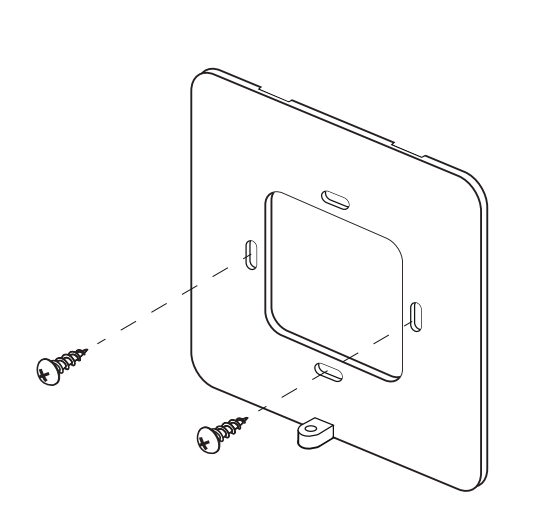
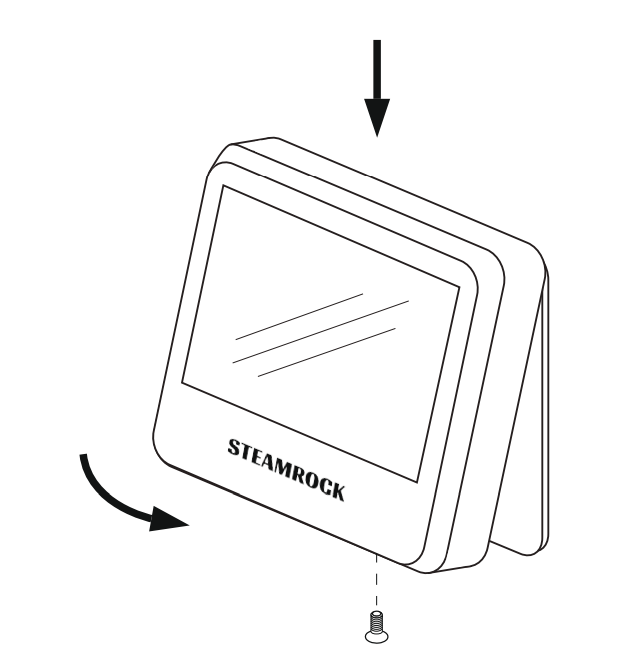
3. After inserting the batteries, enter the calibration and altitude settings (if necessary) and mount the device on the bulkhead or wall by inserting the small flat hooks on the top inner side of the casing into the mounting plate’s indented slots. Carefully push it in place.
4. Screw in the bolt at the bottom of the casing using the provided Phillips mini screwdriver.
LIMITED WARRANTY
If, within one year from the date of original purchase, this device is found to be defective in material or workmanship, it will be replaced or repaired at the discretion of the manufacturer.
This warranty excludes:
- Water or chemical damage
- Battery leakage
- Use of wrong types of batteries
- Installing batteries in reverse polarity
- Physical damage
- Use of the device outside operating limits.
Please refer to SB-42 Limited warranty page for full details.
SPECIFICATIONS
Dimensions: 105 x 105 x 25 mm (4.14″ x 4.14″ x 1″)
Weight: 185g (without batteries)
Power: 3 x AAA (4.5V)
Display: 4.2″ b/w e-paper (85 x 64 mm)
Absolute accuracy: 1 mb/hPa at 0 ~ 50°C (0.0295 inHg at 32 ~ 122°F)
Long term drift: < 1 mb/hPa (0.0295 inHg) per year
15-min timing accuracy: < 1%
Operating limits
Pressure range: 500 ~ 1100 mb/hPa (14.77 ~ 32.48 inHg)
Temperature: 0 ~ 50 °C (32 ~ 122 °F)
PACKAGE CONTENTS
- Steamrock SB-42 digital barograph 1
- Owner’s manual 1
- AAA batteries 3
- Phillips mini screwdriver 1
- Stainless screws 2